
OBJECTIVE
To make a password checker using keypad, LCD, and relay
MODULES REQUIRED
- Relay
- Display keypad 4*4 matrix
- LCD display with i2c module
- Arduino Uno
- Jumper wire
SCHEMATIC DIAGRAM
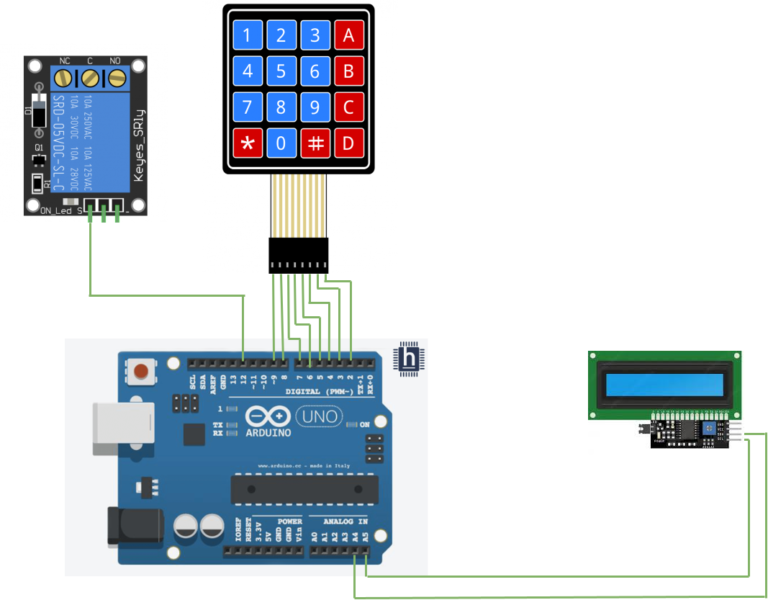
- Connect pin in the Relay module to the pin 12 on the Arduino.
- Connect the SDA pin on the I2C to Arduino pin A4
- Connect the SCL pin on the I2C to Arduino Pin A5
- Connect 1 to 8pin on the display to Arduino D9 to D2 pins
ARDUINO CODE
ARDUINO CODE
C++
#include <Wire.h>
#include <LiquidCrystal_I2C.h>
#include <Keypad.h>

#define Password_Length 8

int signalPin = 12;

char Data[Password_Length];
char Master[Password_Length] = "12A457B";
byte data_count = 0, master_count = 0;
bool Pass_is_good;
char customKey;

const byte ROWS = 4;
const byte COLS = 4;

char hexaKeys[ROWS][COLS] = {
  {'1', '2', '3', 'A'},
  {'4', '5', '6', 'B'},
  {'7', '8', '9', 'C'},
  {'*', '0', '#', 'D'}
};

byte rowPins[ROWS] = {9, 8, 7, 6};
byte colPins[COLS] = {5, 4, 3, 2};

Keypad customKeypad = Keypad(makeKeymap(hexaKeys), rowPins, colPins, ROWS, COLS);

LiquidCrystal_I2C lcd(0x27, 16, 2);

void setup(){
  lcd.init();
  lcd.backlight();
  pinMode(signalPin, OUTPUT);
}

void loop(){

  lcd.setCursor(0,0);
  lcd.print("Enter Password:");

  customKey = customKeypad.getKey();
  if (customKey){
    Data[data_count] = customKey;
    lcd.setCursor(data_count,1);
    lcd.print(Data[data_count]);
    data_count++;
    }

  if(data_count == Password_Length-1){
    lcd.clear();

    if(!strcmp(Data, Master)){
      lcd.print("Correct");
      digitalWrite(signalPin, HIGH);
      delay(5000);
      digitalWrite(signalPin, LOW);
      }
    else{
      lcd.print("Incorrect");
      delay(1000);
      }

    lcd.clear();
    clearData();
  }
}

void clearData(){
  while(data_count !=0){
    Data[data_count--] = 0;
  }
  return;
}
INSTRUCTIONS
- Connect the modules & components as per the schematic diagram.
- Download and install Liquidcrystal_I2c
- Upload the Arduino code into the Arduino board.
- Type the password “123A456” on the keypad and check it is displayed on the LCD.
- Check that it verifies the password correctly and switches ON the relay.
WORKING
Keypad Input
- User enters a password using the keypad.
- The Keypad sends the password input to the Microcontroller Arduino
Password Verification
- The Microcontroller verifies the password with the stored password.
- If the password matches the microcontroller triggers the Relay
Relay Activation
- When the relay is activated LED turns ON.
Display Status
The Display shows the user’s input and Status messages as listed below:
- 1. Password correct
- 2. incorrect
- 3. Access granted
