
OBJECTIVE
Learn how RFID receiver works and how to reading access cards
MODULES REQUIRED
- RFID module
- Servo motor
- Arduino Uno
- Jumper wire
SCHEMATIC DIAGRAM
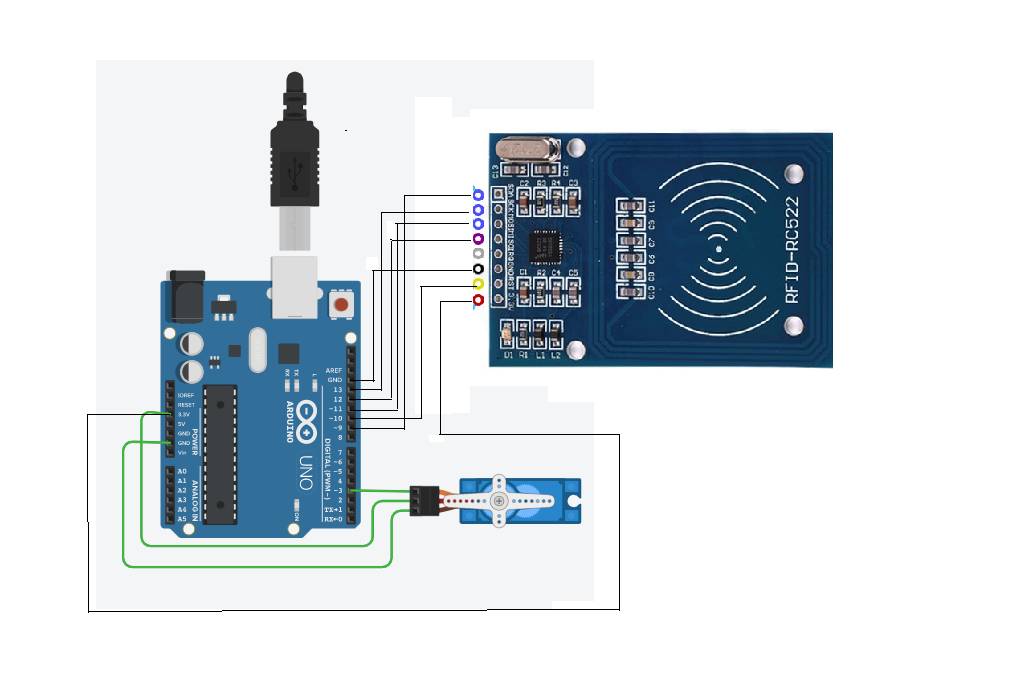
Connect RFID sensor as follows:
- MISO and MOSI to Arduino pins D12 and D11
- SDA and SCK to pins D10 and D13
- RST to D9 and GND to Arduino GND
- 3.3V to Arduino 3.3V.
Connect Servo Motor:
- VCC pin (red) to Arduino 5V
- GND pin (brown) to Arduino GND.
- Common pin (yellow) to Arduino D3.
ARDUINO CODE
JavaScript
#include <SPI.h>
#include <MFRC522.h>
#include <Servo.h>
#define SS_PIN 10
#define RST_PIN 9
MFRC522 mfrc522(SS_PIN, RST_PIN); // Create MFRC522 instance.
#define servoPin 3
Servo myServo;
int pos = 0;
void setup() {
Serial.begin(9600); // Initiate a serial communication
SPI.begin(); // Initiate SPI bus
mfrc522.PCD_Init(); // Initiate MFRC522
Serial.println("Approximate your card to the reader...");
Serial.println();
myservo.attach(3); }
void loop() {
// Look for new cards
if ( ! mfrc522.PICC_IsNewCardPresent()) {
return; }
// Select one of the cards
if ( ! mfrc522.PICC_ReadCardSerial()) {
return; }
//Show UID on serial monitor
Serial.print("UID tag :");
String content= "";
byte letter;
for (byte i = 0; i < mfrc522.uid.size; i++) {
Serial.print(mfrc522.uid.uidByte[i] < 0x10 ? " 0" : " ");
Serial.print(mfrc522.uid.uidByte[i], HEX);
content.concat(String(mfrc522.uid.uidByte[i] < 0x10 ? " 0" : " "));
content.concat(String(mfrc522.uid.uidByte[i], HEX)); }
Serial.println();
Serial.print("Message : ");
content.toUpperCase();
if (content.substring(1) == "XXXXXXXX") //change here the UID of the
card/cards that you want to give access
{
Serial.println("Authorized access");
Serial.println();
sweepServo();
delay(3000); }
else {
Serial.println(" Access denied");
delay(3000);
} }
void sweepServo(){
for (pos = 0; pos <= 180; pos += 1) { // goes from 0 to 180 degrees
// in steps of 1 degree
myservo.write(pos); // tell servo to go to position in variable 'pos'
delay(15); // waits 15ms for the servo to reach the position
}
for (pos = 180; pos >= 0; pos -= 1) { // goes from 180 degrees to 0
degrees
myservo.write(pos); // tell servo to go to position in variable 'pos'
delay(15); // waits 15ms for the servo to reach the position
}}
INSTRUCTIONS
- Connect modules as per the schematic.
- Upload Arduino code to the board.
- Open Files > Examples > MFRC522 > Dumpinfo.
- Upload the Dumpinfo program into the Arduino board.
- Put the card on the RFID sensor to check its UID number.
- Get the UID number from the serial monitor
- Convert UID to decimal and declare in the program.
- Test the door control system with the RFID card.
WORKING
An RFID reader scans a tag, and based on its authorization, the servo motor rotates to open the door .
