
OBJECTIVE
Sensing the distance of objects and learn how Ultrasonic Sensor works
MODULES REQUIRED
- Ultrasonic sensor
- LCD display with i2c module
- Arduino Uno
- Jumper wire
SCHEMATIC DIAGRAM
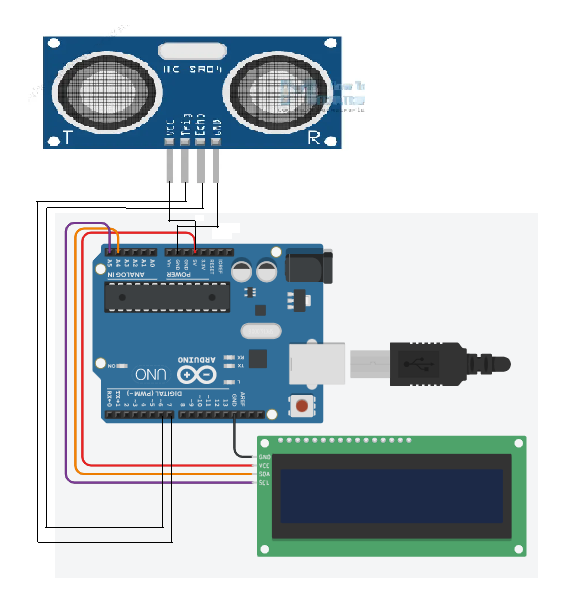
- Connect TRIGGER pin in Ultrasonic sensor to pin D6 on Arduino
- Connect ECHO pin in Ultrasonic sensor to pin D7 on Arduino
- Connect SDA and SCL pin in the LCD to A4 and A5 Arduino pins
Following connection are made in inbuilt circuit, so there no need made these connection:
- Connect Vcc and GND to Arduino 5v and GND leads
- Connect Vcc to GND on Arduino Vcc and GND
ARDUINO CODE
JavaScript
#include <Wire.h>
#include <LiquidCrystal_I2C.h>
LiquidCrystal_I2C lcd(0x27, 16, 2);
#define trigPin 6
//Sensor Echo pin connected to Arduino pin 13
#define echoPin 7
//Sensor Trip pin connected to Arduino pin 12
void setup(){
pinMode(trigPin, OUTPUT);
pinMode(echoPin, INPUT);
lcd.init();
lcd.backlight();
// lcd.clear();
lcd.setCursor(4,0);
lcd.print("Blue Nile");
lcd.setCursor(4,1);
lcd.print("Software");
//lcd.print("Moving Text!!!");
delay(2000);
lcd.clear();
lcd.setCursor(0,0);
//Set LCD cursor to upper left corner, col 0, row 0
lcd.print("Target Distance:");
//Print Message on First Row
//lcd.print("");
delay(2000);
}
void loop(){
long duration, distance;
digitalWrite(trigPin, LOW);
delayMicroseconds(2);
digitalWrite(trigPin, HIGH);
delayMicroseconds(5);
digitalWrite(trigPin, LOW);
duration = pulseIn(echoPin, HIGH);
distance = (duration/2) / 29.1;
lcd.setCursor(0,1); //Set cursor to 1st col of 2nd row
lcd.print(" "); //Print blanks to clear the row
lcd.setCursor(0,1); //Set Cursor again to 1st col of 2nd row
lcd.print(distance); //Print measured distance
lcd.print(" cm"); //Print your units.
delay(250); //pause to let things settle
}INSTRUCTIONS
- Connect the modules & components as per schematic diagram.
- Download and install Liquidcrystal_I2c
- Upload the Arduino code into Arduino board.
WORKING
- The sensor sends out high-frequency sound waves.
- The sensor receives (echo) sound waves.
- The sensor calculates the distance of the object between sending and receiving the sound waves.
