
OBJECTIVE
Sensing the light intensity and learn how LDR Sensor works
MODULES REQUIRED
- LDR sensor
- LED
- Arduino Uno
- Jumper wire
SCHEMATIC DIAGRAM
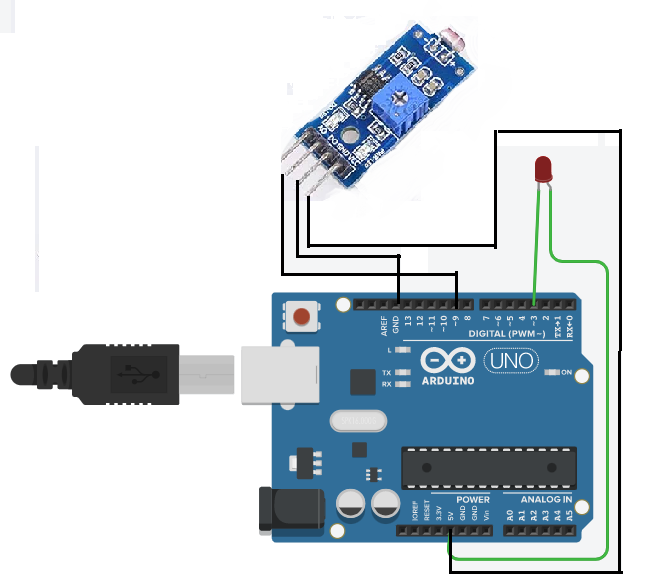
- Connect D0 pin in the LDR sensor module to pin D9 on the Arduino
- Connect the LED pin (anode) to Arduino pin 3
Following connection are made in inbuilt circuit, so there no need made these connection:
- To power the LDR module, connect Vcc and GND to Arduino 5v and GND leads
- Connect GND to GND on Arduino
ARDUINO CODE
JavaScript
int LEDPin = 3;
int LDRPin = 9;
int HIGH2 = 0;
int LOW2 = 1;
void setup(){
pinMode(LEDPin, OUTPUT);
digitalWrite(LEDPin, LOW2);
pinMode(LDRPin, INPUT_PULLUP); }
void loop(){
int detection = !digitalRead(LDRPin);
if (detection == HIGH2){
digitalWrite(LEDPin , HIGH2);
}
if (detection == LOW2){
digitalWrite(LEDPin , LOW2);
} }INSTRUCTIONS
- Connect the modules & components as per the schematic diagram.
- Upload the Arduino code into the Arduino board.
- Check the project in dark and bright environments.
WORKING
- The LDR sensor detects the ambient light intensity.
- The LDR sensor sends the light intensity value to the Arduino board.
- If the light intensity is low, the Arduino board turns on the LED light.
- If the light intensity is high, the Arduino board turns off the LED light.
