
OBJECTIVE
Gas leak Alert using a buzzer and learn how Gas Sensor works.
MODULES REQUIRED
- Gas sensor
- Buzzer
- Arduino Uno
- Jumper wire
SCHEMATIC DIAGRAM
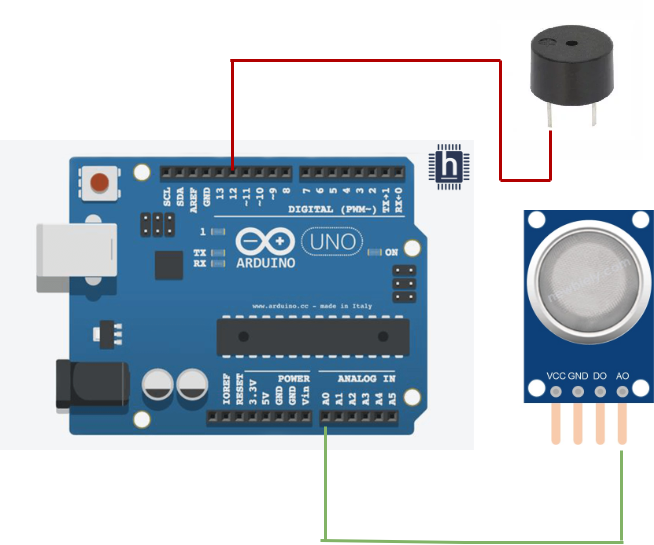
- Connect A0 pin in the gas sensor module to the pin A0 on the Arduino
- Connect the SIG pin on the Buzzer module to Arduino pin D12
ARDUINO CODE
JavaScript
int gasSensorPin = A0; // Analog pin A0 connected to the gas sensor
int buzzerPin = 12; // Digital pin 12 connected to the buzzer
int threshold = 300; // Gas detection threshold value (adjust based on
your sensor and environment)
void setup() {
pinMode(buzzerPin, OUTPUT); // Set buzzer pin as output
Serial.begin(9600); // Initialize serial communication
}
void loop() {
int gasLevel = analogRead(gasSensorPin); // Read gas level from sensor
Serial.print("Gas level: ");
Serial.println(gasLevel); // Print gas level to the Serial Monitor
if (gasLevel > threshold) { // If gas level exceeds the threshold
digitalWrite(buzzerPin, HIGH); // Turn on the buzzer
} else {
digitalWrite(buzzerPin, LOW); // Turn off the buzzer
}
delay(1000); // Wait for 1 second before checking again
}INSTRUCTIONS
- Connect the modules & components as per schematic diagram.
- Upload the Arduino code into Arduino board.
- Verify the buzzer ON when the gas sensor detects gas.
WORKING
- The gas sensor detects harmful gases like LPG, CO, and methane in the atmosphere
- When the gas level exceeds a dangerous threshold, the sensor sends a signal to the microcontroller Arduino
- The microcontroller receives the signal and activates the alarm (buzzer) or LED lights.
- The alarm sounds or lights up to alert people in the area of potential danger.
