
OBJECTIVE
Display Digits from 0 to 9 using a 7 segment display unit and Arduino
MODULES REQUIRED
- 7 segment display (here it is CA mode)
- Arduino UNO
- Jumper Wire
SCHEMATIC DIAGRAM
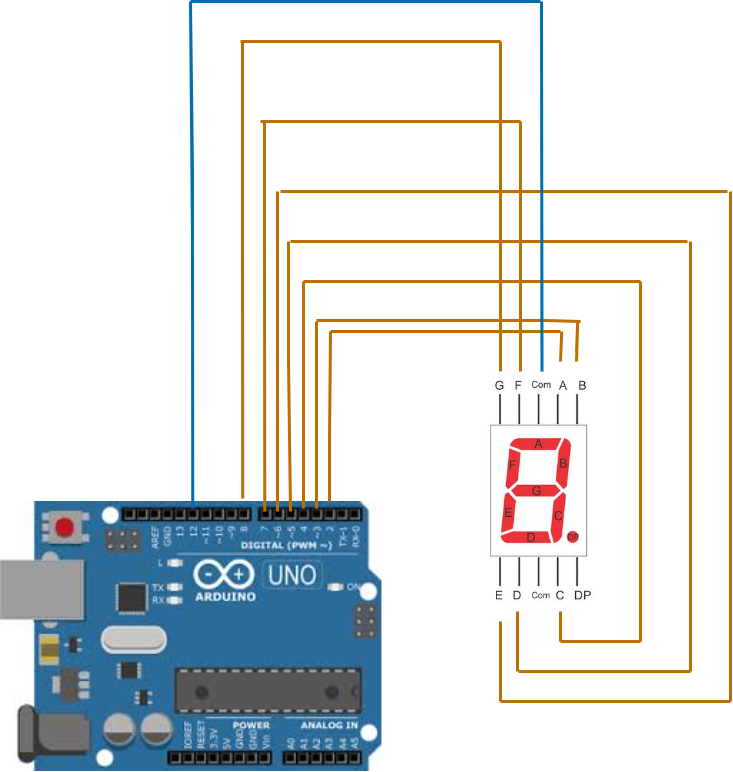
- Wire the A to G pins in the 7-segment display to UNO digital pins from D2 to D8 (as shown in the figure).
- Connect the seg1 pin in the segment display to Arduino pin D12.
ARDUINO CODE
JavaScript
int digit[10] = {0b0111111, 0b0000110, 0b1011011, 0b1001111,
0b1100110, 0b1101101, 0b1111101, 0b0000111, 0b1111111,
0b1101111};
int digit1;
void setup(){
for (int i = 2; i < 9; i++){
pinMode(i, OUTPUT); }
pinMode(12, OUTPUT); //declare 7 seg Digit1 pin as output
}
void loop() {
for (int j = 0; j <= 9; j++) {
digit1 = j % 10;
for ( int k = 0; k < 20; k++){
digitalWrite(12, HIGH);
dis(digit1);
delay(10);
digitalWrite(12, LOW);
dis(digit1);
delay(10);
} } }
void dis(int num){
for (int i = 2; i < 9; i++) {
digitalWrite(i, bitRead(digit[num], i - 2));
}}INSTRUCTIONS
- Connect the modules & components as per schematic diagram.
- Upload the Arduino code into Arduino board.
- Ensure all connections are correct and the display shows the correct digits.
WORKING
- The display features 7 segments (a-g) activated by an Arduino microcontroller to show numbers 0-9 based on the segments illuminated.
