
OBJECTIVE
To display real-time humidity and temperature on the OLED screen.
MODULES REQUIRED
- Arduino NANO
- Jumper wire
- Humidity sensor
- OLED Display
SCHEMATIC DIAGRAM
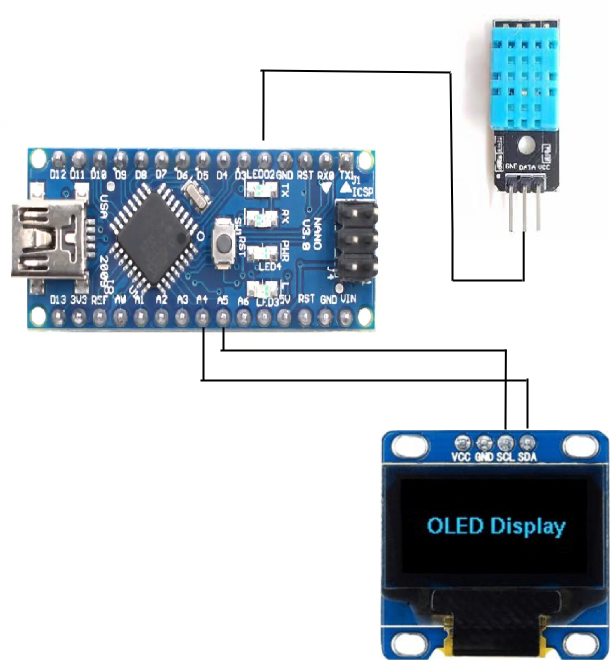
Connect OLED:
- Connect the SDA pin on the OLED to Arduino NANO A4.
- Connect the SCL pin on the OLED to Arduino NANO A5.
Connect Humidity sensor:
- Connect the DATA pin to Arduino NANO D2
ARDUINO CODE
ARDUINO CODE
C++
#include "DHT.h"
#define DHT11Pin 2
#define DHTType DHT11
//OLED
#include <Wire.h>
#include <Adafruit_GFX.h>
#include <Adafruit_SSD1306.h>

DHT HT(DHT11Pin,DHTType);
float humi;
float tempC;
float tempF;

//OLED define
#define SCREEN_WIDTH 128 //OLED display width, in pixels
#define SCREEN_HEIGHT 64 //OLED display height, in pixels
//SSD1306 display connected to I2C (SDA, SCL pins)
Adafruit_SSD1306 display(SCREEN_WIDTH, SCREEN_HEIGHT, &Wire, -1);

void setup() {
 Serial.begin(9600);
 //For DHT11
 HT.begin();
 //Necessary code for OLED I2C
 if(!display.begin(SSD1306_SWITCHCAPVCC, 0x3C)) { // Address 0x3D for 128x64
  Serial.println(F("SSD1306 allocation failed"));
  for(;;);
 }
 display.display(); //Displays the starting logo
 delay(1000);
 display.clearDisplay();
}
void loop() {
 delay(1000);
 humi = HT.readHumidity();
 tempC = HT.readTemperature();
 tempF = HT.readTemperature(true);

 display.clearDisplay();
 oledDisplayHeader();
 //configures the position of the readings. (charactersize, x axis value, y axis value, reading, symbol)
oledDisplay(2,90,28,humi,"%");
 oledDisplay(3,-10,44,tempC,"C");
 oledDisplay(3,-10,16,tempF,"F");
 display.display();
}
void oledDisplayHeader(){
 //configures position and qualities of headers
 display.setTextSize(1);
 display.setTextColor(WHITE);
 display.setCursor(0, 0);
 display.print("Temperature");
 display.setCursor(80, 0);
 display.print("Humidity");
}
void oledDisplay(int size, int x,int y, float value, String unit){
 int charLen=18;
 int xo=x+charLen*3.2;
 int xunit=x+charLen*3.6;
 int xval = x;
 display.setTextSize(size);
 display.setTextColor(WHITE);

 if (unit=="%"){
  display.setCursor(x, y);
  display.print(value,0);
  display.print(unit);
 }
 else {
 if (value>99){
 xval=x;
 } else {
 xval=x+charLen;
 }
 display.setCursor(xval, y);
 display.print(value,0);
 display.drawCircle(xo, y+2, 2, WHITE); // print degree symbols
 display.setCursor(xunit, y);
 display.print(unit);
 }
 }
INSTRUCTIONS
- Connect the modules and components as per the schematic diagram.
- Download and install DHT sensor library
- Upload the Arduino code into the Arduino board.
- Check it shows temperature and humidity on OLED display.
WORKING
- The DHT11/DHT22 sensor measures temperature and humidity, with the results shown on an OLED display connected to the Arduino Nano.
