
OBJECTIVE
To detect and respond to the presence or movement of objects using infrared light.
MODULES REQUIRED
- Arduino UNO
- IR Sensor
- LED
- Jumper wire
SCHEMATIC DIAGRAM
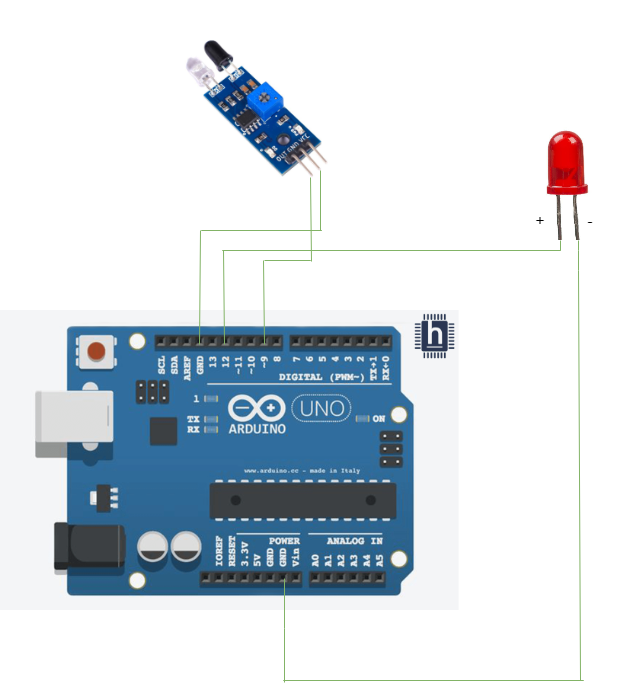
Connect PIR sensor:
- Connect Out pin in the IR sensor module to the pin D9 on the Arduino.
- Connect GND pin on the IR sensor to the pin GND on the Arduino
Connect LED:
- Connect the LED pin(positive) to Arduino pin 12
ARDUINO CODE
JavaScript
int IRSensor = 9; // connect ir sensor module to Arduino pin 9
int LED = 12; // conect LED to Arduino pin 13
void setup(){
Serial.begin(115200); // Init Serila at 115200 Baud
Serial.println("Serial Working"); // Test to check if serial is working or not
pinMode(IRSensor, INPUT); // IR Sensor pin INPUT
pinMode(LED, OUTPUT); // LED Pin Output
}
void loop(){
int sensorStatus = digitalRead(IRSensor); // Set the GPIO as Input
if (sensorStatus == 1) // Check if the pin high or not
{ // if the pin is high turn off the onboard Led
digitalWrite(LED, HIGH); // LED LOW
Serial.println("Motion Ended!"); // print Motion Detected! on the serial
monitor window
}
else {
//else turn on the onboard LED
digitalWrite(LED, LOW); // LED High
Serial.println("Motion Detected!"); // print Motion Ended! on the serial
monitor window
} }INSTRUCTIONS
- Connect the modules and components as per the schematic diagram.
- Upload the Arduino code into the Arduino board.
- Detect motion by measuring changes in infrared light reflections and triggering an alert or action.
WORKING
- Motion detection IR sensor works by emitting IR light.
- When motion is detected, the light will turn ON.
- When no motion is detected, the light will turn OFF.
