
OBJECTIVE
To monitor access, signaling authorized access with a green LED and unauthorized access with a red LED based on RFID tag scans.
MODULES REQUIRED
- Arduino UNO
- Jumper wire
- RFID & CARD
- LED1
- LED 2
- LCD Display
SCHEMATIC DIAGRAM
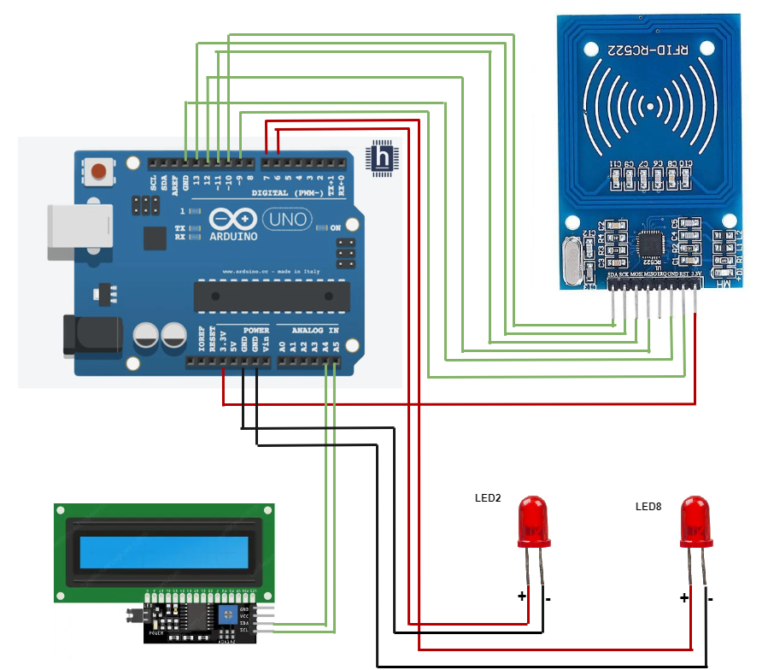
Connect RFID sensor as follows:
- MISO and MOSI to Arduino pins D12 and D11
- SDA and SCK to pins D10 and D13
- RST to D9 and GND to Arduino GND
- 3.3V to Arduino 3.3V.
Connect LCD:
- SDA and SCL leads to A4 and A5 Arduino pins.
Connect LED 1 and 2:
- Connect the LED pins(positive) to Arduino pin D6 & D7.
*Note: The negative pin (LED) connects to GND in the built-in circuit, no additional connection needed.
ARDUINO CODE
JavaScript
#include <SPI.h>
#include <MFRC522.h>
#include <Wire.h>
#include <LiquidCrystal_I2C.h>
//declare the uid no of rfid card in the below variable as decimal value
const byte monUID[4] = {xx, xx, xx, xx};
bool valid=true;
#define PIN_LED_ROUGE 7
#define PIN_LED_VERTE 6
#define PIN_RST 9
#define PIN_SDA 10
LiquidCrystal_I2C lcd(0x27, 16, 2);
MFRC522 rfid(PIN_SDA, PIN_RST);
void setup(){
SPI.begin();
rfid.PCD_Init();
pinMode(PIN_LED_ROUGE, OUTPUT);
digitalWrite(PIN_LED_ROUGE, HIGH);
pinMode(PIN_LED_VERTE, OUTPUT);
digitalWrite(PIN_LED_VERTE, HIGH);
lcd.init();
lcd.init();
lcd.backlight();
lcd.setCursor(0, 0);
lcd.print("Blue Nile Soft :)");
delay(5000);
lcd.clear();
}
void loop(){
if (rfid.PICC_IsNewCardPresent()) {
if (rfid.PICC_ReadCardSerial()) {
for (int i = 0; i < rfid.uid.size; i++) {
if (rfid.uid.uidByte[i] != monUID[i])
{valid=false;}
else
{valid=true;}
}
if (valid == 1) {
// digitalWrite(PIN_LED_VERTE, HIGH);
lcd.print("Access Granted :)");
digitalWrite(PIN_LED_VERTE, LOW);
delay(1000);
digitalWrite(PIN_LED_VERTE, HIGH);
lcd.clear();
}
else // UID non valide
{
// digitalWrite(PIN_LED_ROUGE, HIGH);
lcd.print("Access Denied :(");
digitalWrite(PIN_LED_ROUGE, LOW);
delay(1000);
digitalWrite(PIN_LED_ROUGE, HIGH);
lcd.clear();
} }}}
INSTRUCTIONS
- Connect the modules and components as per the schematic diagram.
- Open Files > Examples > MFRC522 > Dumpinfo.
- Upload the Dumpinfo program into the Arduino board.
- Put the card on the RFID sensor to check its UID number.
- Get the UID number from the serial monitor.
- Then convert the UID number into a decimal value and declare it in the specified variable in the program.
- Upload the Arduino code into the Arduino board.
- Test the access control system by using the RFID card.
WORKING
- An RFID reader scans a tag, and based on its authorization, a of "Access Granted" or "Access Denied" is displayed on the LCD while simultaneously illuminating a LED1 for granted access or a LED2 for denied access.
