
OBJECTIVE
The aim of this project prototype is it to design an reverse parking system which will assist the driver to make parking easily.
MODULES REQUIRED
- Arduino Nano
- Jumper wire
- LED
- Bluetooth Module
- LCD Display with I2C module.
SCHEMATIC DIAGRAM
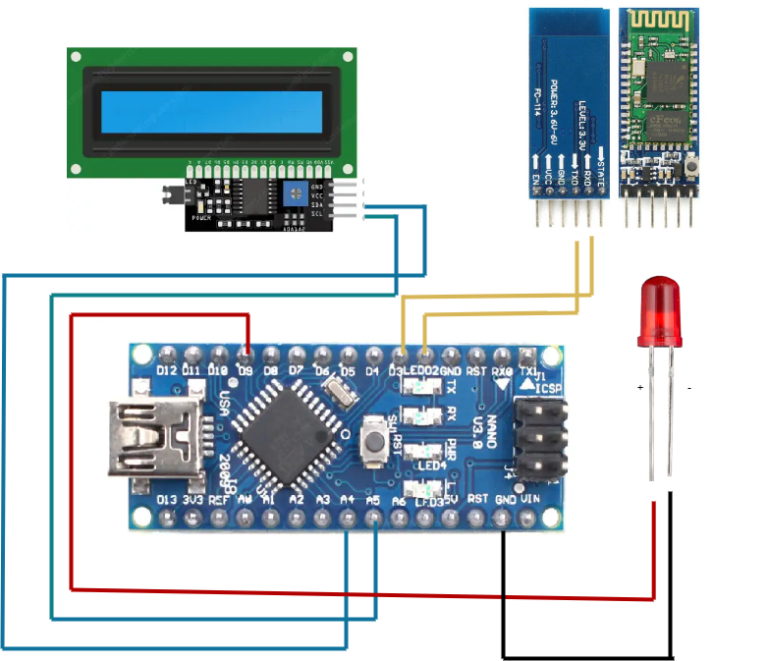
Connect LCD:
- SCL pin (I2C module) to A5 (Arduino NANO).
- SDA pin (I2C module) to A4 (Arduino NANO).
Connect Bluetooth:
- TX pin and RX pin (Bluetooth) to D2 and D3 (Arduino NANO).
Connect LED:
- Positive pin (LED) to D9 (Arduino NANO).
*Note: The negative pin (LED) connects to GND in the built-in circuit, no additional connection needed
ARDUINO CODE
JavaScript
#include <Wire.h>
#include <LiquidCrystal_I2C.h>
#include <SoftwareSerial.h>
// Initialize the I2C LCD with the address 0x27
LiquidCrystal_I2C lcd(0x27, 16, 2);
// Create a SoftwareSerial port for the Bluetooth module
SoftwareSerial bluetooth(2, 3); // RX, TX
// LED pin
const int ledPin = 9;
void setup() {
// Initialize the LCD with 16 columns and 2 rows
lcd.begin(16, 2);
lcd.init();
lcd.backlight();
// Initialize Bluetooth communication at 9600 baud
bluetooth.begin(9600);
// Set LED pin as output
pinMode(ledPin, OUTPUT);
// Display a welcome message
lcd.setCursor(0, 0);
lcd.print("Bluetooth LED");
lcd.setCursor(0, 1);
lcd.print("Control Ready");
delay(2000);
lcd.clear();
}
void loop() {
// Check if data is available from the Bluetooth module
if (bluetooth.available()) {
char data = bluetooth.read(); // Read the incoming data
if (data == '1') {
digitalWrite(ledPin, LOW); // Turn the LED on
lcd.clear();
lcd.setCursor(0, 0);
lcd.print("LED Status:");
lcd.setCursor(0, 1);
lcd.print("ON");
}
else if (data == '0') {
digitalWrite(ledPin, HIGH); // Turn the LED off
lcd.clear();
lcd.setCursor(0, 0);
lcd.print("LED Status:");
lcd.setCursor(0, 1);
lcd.print("OFF");
} } }INSTRUCTIONS
- Connect the modules and components as per the schematic diagram
- Download and install library LiquidCrystal_I2C
- Upload the Arduino code into the Arduino board.
- Install the Serial Bluetooth Terminal app on the other device
- Check the Bluetooth module name
- Connect it with the other device for data transmission
- Use a Bluetooth module to send commands 0 and 1 from your phone to the Arduino Nano, which controls the LED ON/OFF and displays the status on the LCD screen.
WORKING
- With a Bluetooth connection, you can send commands from your phone to the Arduino Nano.
- The Arduino then turns an LED on or off based on the command.
- At the same time, the LCD screen shows whether the LED is ON or OFF.
