
OBJECTIVE
The objective of using a Bluetooth module with Arduino is to create a system that can be controlled remotely using a smartphone or tablet
MODULES REQUIRED
- Arduino UNO
- Bluetooth Module
- Jumper wire
SCHEMATIC DIAGRAM
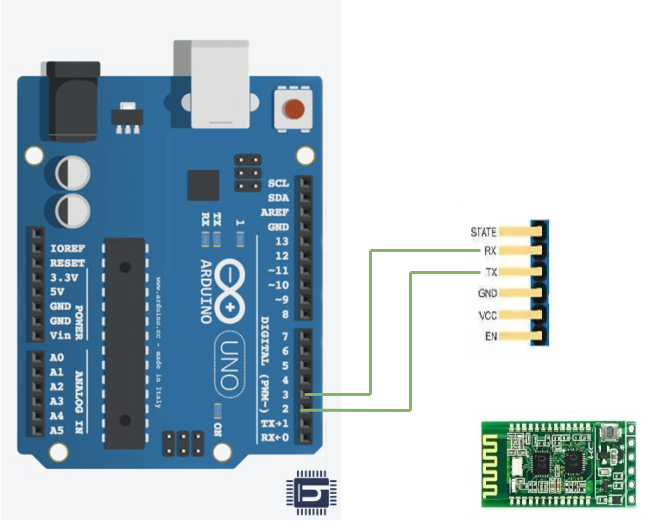
Connect Bluetooth:
- Connect the TX pin on the Bluetooth to Arduino UNO pin D2 .
- Connect the RX pin on the Bluetooth to Arduino UNO Pin D3.
ARDUINO CODE
JavaScript
#include<Softwareserial.h>
/*Create object nasoftwareserial*/
SoftwareSerial bt(2,3);/*(Rx,Tx)*/
void setup() {
bt.begin(9600);/*Define baud rate for software serial communication*/
Serial.begin(9600);/* Define baud rate for serial communication*/
}
void loop() {
if (bt.available()) /* If data is available on serial port*/
{
Serial.write(bt.read());/* Print character received on to the serial monitor*/
}
}
INSTRUCTIONS
- Connect the modules and components as per the schematic diagram.
- Upload the Arduino code into the Arduino board.
- Install the Serial Bluetooth Terminal app on the other device.
- Check the Bluetooth module name.
- Connect it with the other device for data transmission.
- Send the message through the Serial Bluetooth Terminal app
- Check if it is received in the serial monitor in Arduino IDE.
WORKING
- A Bluetooth module with an Arduino Uno enables wireless serial communication by transmitting and receiving data through the TX and RX pins.
